microGPT 3D
ChatGPT has around a trillion parameters and runs in a datacenter. The model in this tutorial is the same species of machine — a real GPT, with real attention, real gradients, real training — shrunk until the whole thing fits in ~150 lines of plain Python and runs live in this browser tab. Small enough that nothing has to be skipped, hand-waved, or taken on faith: every number you’ll see in the 3D scenes is genuinely computed, and by the last lesson you will have watched every line of the source code do its job.
This is an interactive, browser-side, 3D-visual tutorial for Andrej Karpathy’s ~150-line microGPT — a complete decoder-only transformer written in pure Python, no libraries.
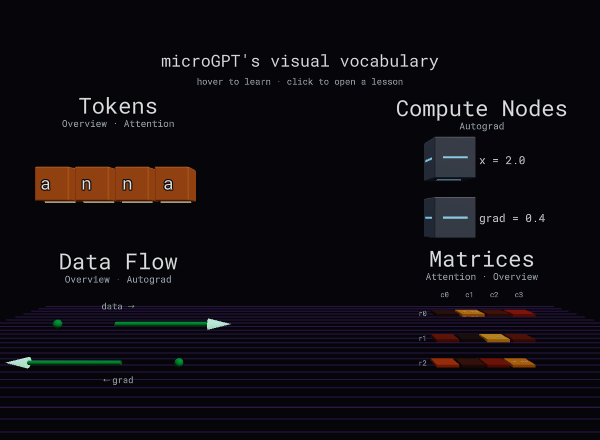
The four primitives above — TokenCubes, NodeBlocks, ConnectorArrows, and a MatrixGrid — are the entire visual vocabulary every lesson speaks. The model is small enough to run entirely in your browser: the TypeScript port ships ~89 KB of trained weights and computes every logit you see in the 3D scenes live, with no backend.
What’s inside
Each lesson follows the same structure: a short theory section, the annotated Python slice it’s about, and an interactive 3D sandbox you can poke. Sandboxes are theme-aware (warm light / cyber dark) and pause-and-seek along a timeline scrubber.
- 01 · Overview — the whole loop in thirty seconds: characters in, a probability for every possible next character out. Forward, loss, and sampling as three modes you can drive.
- 02 · Autograd — Karpathy’s 25-line Value class as a
rotatable DAG. Type any expression, drag the variables, play forward and
backward pulses. This is how
.backward()works. - 03 · Attention — one head, one query:
q·kᵀ/√d→ causal mask → softmax → weighted values. Click a score cell for its dot product. - 04 · Transformer Block — the
gpt()function itself: embedding → RMSNorm → attention → residual → MLP → residual → logits. Click any module for its input/output shapes and exact Python. - 05 · Training & Generation — the rest of the file: watch a name generated character by character with a live temperature slider, and see one real gradient and Adam update calculation (forward → loss → backward → optimizer).
How to read this
A reasonable path is straight through 01 → 05, but each lesson stands alone:
- New to AI, or never touched linear algebra or calculus? Start at 00 · Foundations — the five ideas everything else is built from, in plain language. Keep the Glossary open in a tab.
- New to transformers? Start at 01 for the bird’s-eye loop, then 04 to see the forward pass wired up end to end.
- Want the math of attention? Jump to 03.
- Wondered how
.backward()actually works? 02 is the shortest path — and 05 shows that same gradient driving a real Adam update calculation. - Curious how the model learns, then babbles brand-new names? 05.
Beyond V1
The code, the Blender scripts that generated every .glb, and the
implementation plans live in the repo .
The README has dev setup. The five lessons cover the complete training,
forward-pass, and generation algorithm; future work (multi-layer configs,
training-in-the-browser) is tracked in the spec.